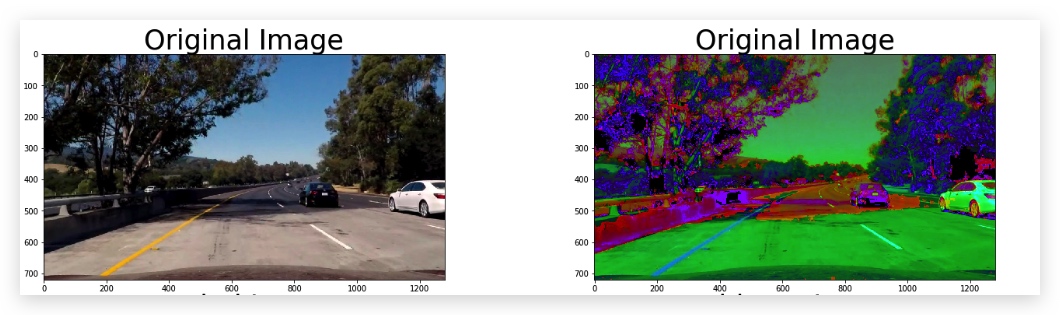
梯度和色彩空间
梯度阈值
Sobel Operator
gradient = \sum(region * S_x)gradient=∑(region∗S x)
- 选取kernel大小为3 的sobel算子,对图片在x,y方向分别求导数
- 对于kernel大小范围的区域,如果在x方向上有像素变化,则sobel_x求得的结果不为0,如果没变化,则求得的矩阵全部元素相加为0
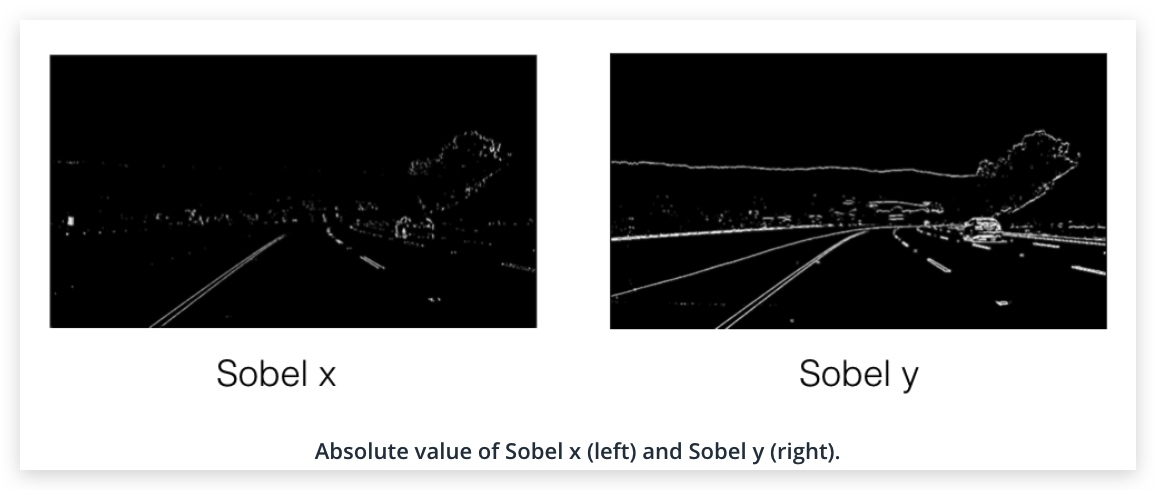
求x方向的梯度可以加强近垂直线,求y方向梯度可以增强近水平线
Use cv2.COLOR_RGB2GRAY if you've read in an image using mpimg.imread(). Use cv2.COLOR_BGR2GRAY if you've read in an image using cv2.imread().
Magnitude of the Gradient
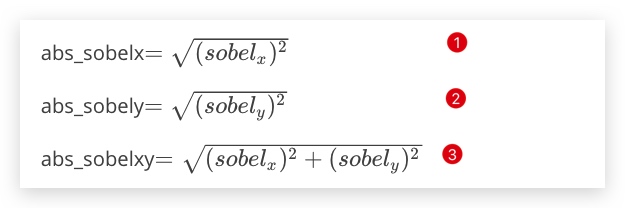
x方向上的梯度y方向上梯度x·,y两个方向上的梯度
It's important to note here that the kernel size should be an odd number. Since we are searching for the gradient around a given pixel, we want to have an equal number of pixels in each direction of the region from this central pixel, leading to an odd-numbered filter size - a filter of size three has the central pixel with one additional pixel in each direction, while a filter of size five has an additional two pixels outward from the central pixel in each direction.
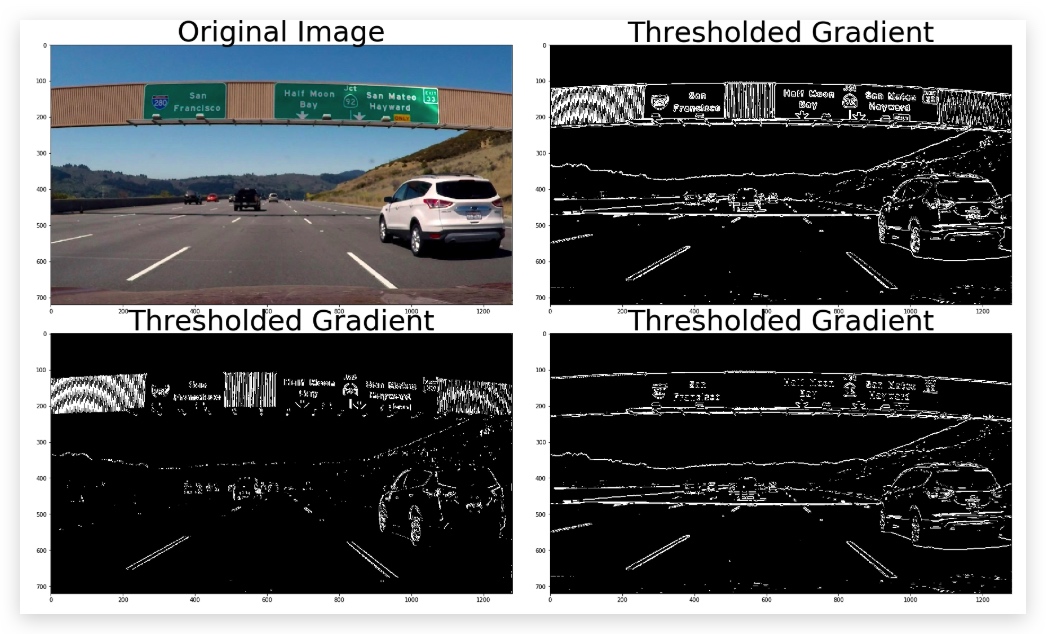
import numpy as np
import cv2
import matplotlib.pyplot as plt
import matplotlib.image as mpimg
import pickle


# Read in an image and grayscale it
image = mpimg.imread('signs_vehicles_xygrad.png')

# Define a function that applies Sobel x or y,
# then takes an absolute value and applies a threshold.
# Note: calling your function with orient='x', thresh_min=5, thresh_max=100
# should produce output like the example image shown above this quiz.
def abs_sobel_thresh(img, sobel_kernel=3,orient='x', thresh_min=0, thresh_max=255):

    # Apply the following steps to img
    # 1) Convert to grayscale
    # 2) Take the derivative in x or y given orient = 'x' or 'y'
    # 3) Take the absolute value of the derivative or gradient
    # 4) Scale to 8-bit (0 - 255) then convert to type = np.uint8
    # 5) Create a mask of 1's where the scaled gradient magnitude
            # is > thresh_min and < thresh_max
    # 6) Return this mask as your binary_output image
    gray = cv2.cvtColor(img,cv2.COLOR_RGB2GRAY)

    for o in orient:
        if o == 'x':
            sobelx = cv2.Sobel(gray,cv2.CV_64F,1,0)
            abs_sobelx = np.absolute(sobelx)
            scaled_sobel = np.uint8(255*abs_sobelx/np.max(abs_sobelx))
        elif o == 'y':
            sobely = cv2.Sobel(gray,cv2.CV_64F,0,1)
            abs_sobely = np.absolute(sobely)
            scaled_sobel = np.uint8(255*abs_sobely/np.max(abs_sobely))
        else:
            pass

    if orient =='xy':
        abs_sobel_xy = (abs_sobelx**2+abs_sobely**2)**0.5
        scaled_sobel = np.uint8(255*abs_sobel_xy/np.max(abs_sobel_xy))

    #print(scaled_sobel)
    sxbinary = np.zeros_like(scaled_sobel)
    sxbinary[(scaled_sobel >= thresh_min) & (scaled_sobel <= thresh_max)] = 1

    binary_output = np.copy(sxbinary) # Remove this line
    return binary_output

# Run the function
grad_binary_x = abs_sobel_thresh(image, orient='x', thresh_min=30, thresh_max=100)
grad_binary_y = abs_sobel_thresh(image, orient='y', thresh_min=30, thresh_max=100)
grad_binary_xy = abs_sobel_thresh(image, orient='xy', thresh_min=30, thresh_max=100)

# Plot the result
f, ((ax1, ax2) ,(ax3,ax4)) = plt.subplots(2, 2, figsize=(24, 9))
f.tight_layout()
ax1.imshow(image)
ax1.set_title('Original Image', fontsize=50)
ax2.imshow(grad_binary_xy, cmap='gray')
ax2.set_title('Thresholded Gradient', fontsize=50)
plt.subplots_adjust(left=0., right=1, top=1.5, bottom=0.)
ax3.imshow(grad_binary_x, cmap='gray')
ax3.set_title('Thresholded Gradient', fontsize=50)
plt.subplots_adjust(left=0., right=1, top=1.5, bottom=0.)
ax4.imshow(grad_binary_y, cmap='gray')
ax4.set_title('Thresholded Gradient', fontsize=50)
plt.subplots_adjust(left=0., right=1, top=1.5, bottom=0.)
Direction of the Gradient
梯度的方向:actan(sobely/sobelx)
https://zh.wikipedia.org/wiki/Atan2
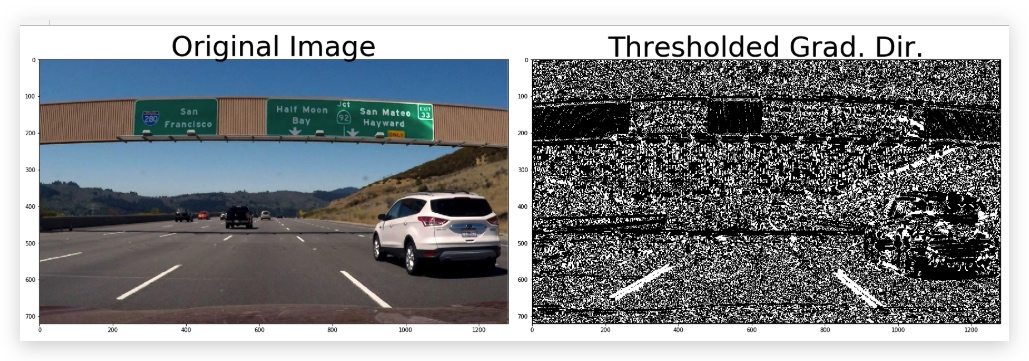
import numpy as np
import cv2
import matplotlib.pyplot as plt
import matplotlib.image as mpimg
import pickle


# Read in an image
image = mpimg.imread('signs_vehicles_xygrad.png')

# Define a function that applies Sobel x and y,
# then computes the direction of the gradient
# and applies a threshold.
def dir_threshold(img, sobel_kernel=3, thresh=(0, np.pi/2)):

    # Apply the following steps to img
    # 1) Convert to grayscale
    # 2) Take the gradient in x and y separately
    # 3) Take the absolute value of the x and y gradients
    # 4) Use np.arctan2(abs_sobely, abs_sobelx) to calculate the direction of the gradient
    # 5) Create a binary mask where direction thresholds are met
    # 6) Return this mask as your binary_output image
    gray = cv2.cvtColor(img,cv2.COLOR_RGB2GRAY)
    sobelx = cv2.Sobel(gray,cv2.CV_64F,1,0,ksize=sobel_kernel)
    sobely = cv2.Sobel(gray,cv2.CV_64F,0,1,ksize=sobel_kernel)
    abs_sobelx = np.absolute(sobelx)
    abs_sobely = np.absolute(sobely)

    direction = np.arctan2(abs_sobely,abs_sobelx)

    mask = np.zeros_like(direction)
    mask[(direction >= thresh[0]) & (direction <= thresh[1])] = 1

    binary_output = np.copy(mask) # Remove this line
    return binary_output

# Run the function
dir_binary = dir_threshold(image, sobel_kernel=15, thresh=(0.7, 1.3))
# Plot the result
f, (ax1, ax2) = plt.subplots(1, 2, figsize=(24, 9))
f.tight_layout()
ax1.imshow(image)
ax1.set_title('Original Image', fontsize=50)
ax2.imshow(dir_binary, cmap='gray')
ax2.set_title('Thresholded Grad. Dir.', fontsize=50)
plt.subplots_adjust(left=0., right=1, top=0.9, bottom=0.)
Combining Thresholds
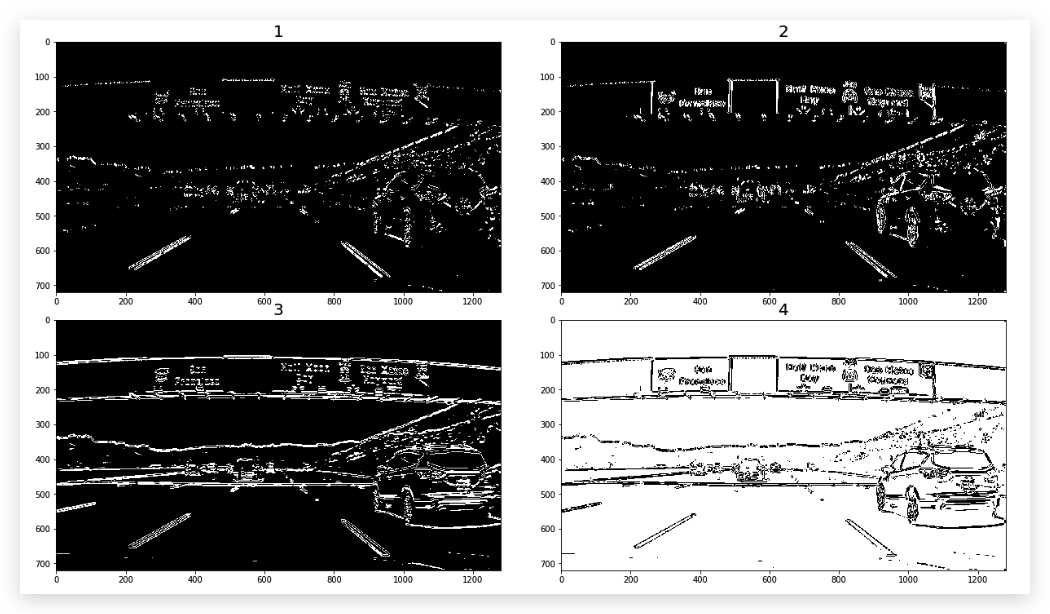
combined1 = np.zeros_like(dir_binary)
combined2 = np.zeros_like(dir_binary)
combined3 = np.zeros_like(dir_binary)
combined4 = np.zeros_like(dir_binary)

combined1[((gradx == 1) & (grady == 1)) | ((mag_binary == 1) & (dir_binary == 1))] = 1
combined2[((gradx == 1) & (grady == 0)) | ((mag_binary == 1) & (dir_binary == 1))] = 1
combined3[((gradx == 0) & (grady == 1)) | ((mag_binary == 1) & (dir_binary == 1))] = 1
combined4[((gradx == 0) & (grady == 0)) | ((mag_binary == 1) & (dir_binary == 1))] = 1


f, ((ax1, ax2) ,(ax3,ax4)) = plt.subplots(2, 2, figsize=(24, 9))
f.tight_layout()
ax1.imshow(combined1,cmap="gray")
ax1.set_title('1', fontsize=fontsize)
ax2.imshow(combined2, cmap='gray')
ax2.set_title('2', fontsize=fontsize)
ax3.imshow(combined3, cmap='gray')
ax3.set_title('3', fontsize=fontsize)
ax4.imshow(combined4, cmap='gray')
ax4.set_title('4', fontsize=fontsize)

plt.subplots_adjust(left=0., right=0.7, top=1, bottom=0.)
小结
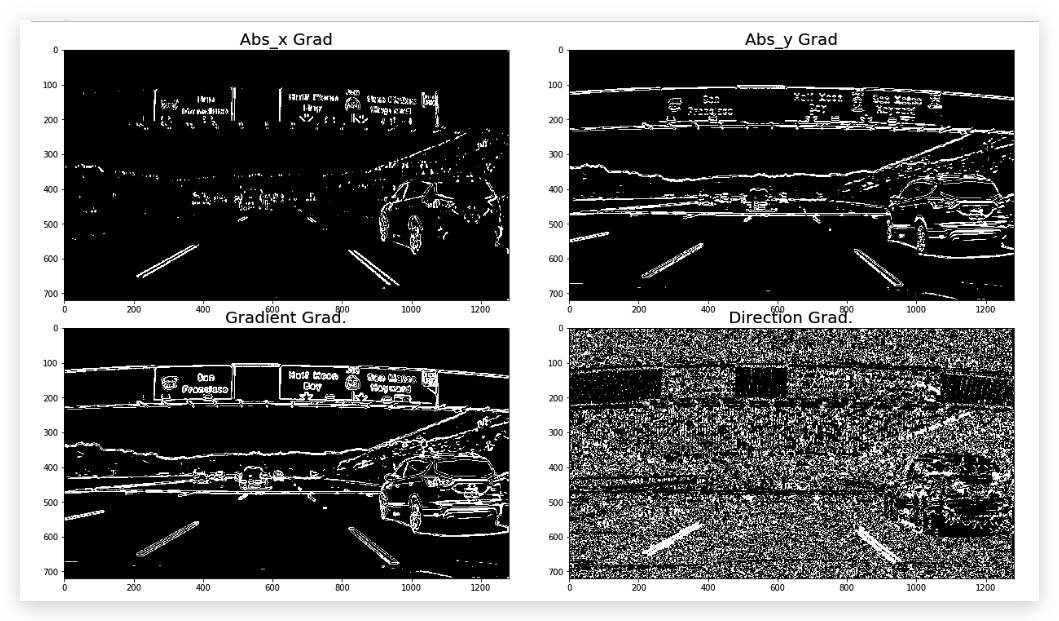
sobel 算子时canny算法的核心,我们对图像在x或y方向求导,如果图像发生了变化,我们就能在对应的方向上捕获它,最终就形成了线条。对图像应用sobel x有助于检测到垂直的线条,sobel y有助于检测到水平的线条,但是一般我们是取其绝对值。因此当我们求两个方向上的绝对值时,就得到了Magnitude of the Gradient,这样就能检测到所有的边缘,这就是canny算法能够发现全部边缘的原因。然而对于车道线的检测来讲,我们希望得到的是接近垂直的边缘,因此我们要计算梯度的方向,也就是Direction of the Gradient。计算这个值我们需要用到atan2(y, x) 也就是 atan(y/x)。
彩色空间
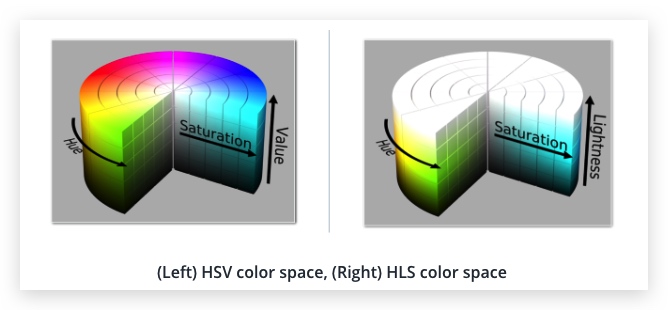
HSV and HSL
Hue: Lightness : Value : Saturation:
HLS and Color Thresholds
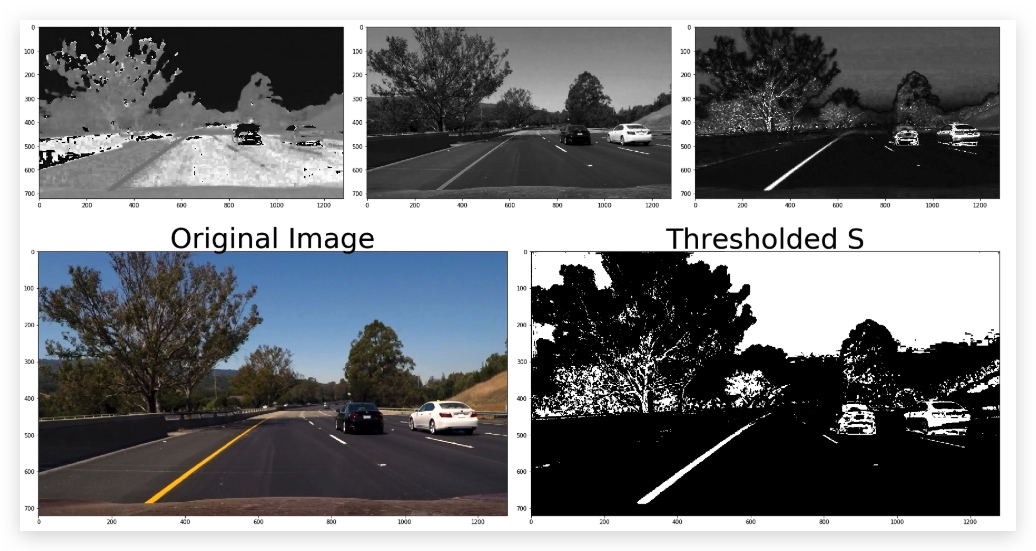
def hls_select(img, thresh=(0, 255)):
    # 1) Convert to HLS color space
    hls = cv2.cvtColor(img,cv2.COLOR_BGR2HLS)
    H = hls[:,:,0]
    L = hls[:,:,1]
    S = hls[:,:,2]
    f, (ax1, ax2 , ax3) = plt.subplots(1, 3, figsize=(24, 9))
    f.tight_layout()
    ax1.imshow(H,cmap="gray")
    ax2.imshow(L,cmap="gray")
    ax3.imshow(S,cmap="gray")
    binary_output = np.zeros_like(S)
    binary_output[(S>thresh[0])&(S<=thresh[1])]=1
    # 2) Apply a threshold to the S channel
    # 3) Return a binary image of threshold result
    binary_output = np.copy(binary_output) # placeholder line
    return binary_output
Combine Color and Gradient
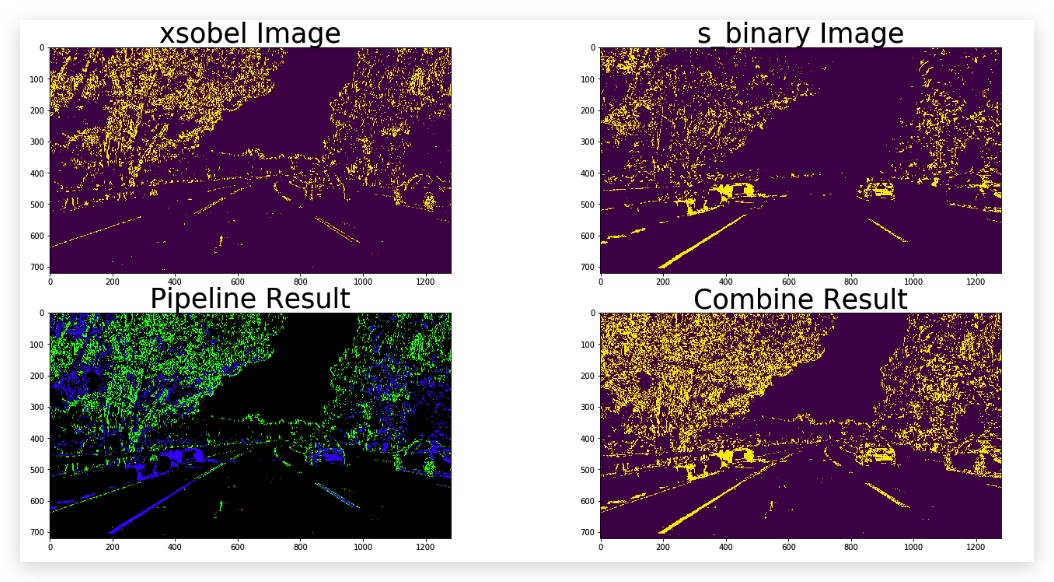
def pipeline(img, s_thresh=(170, 255), sx_thresh=(20, 100)):
    img = np.copy(img)
    # Convert to HLS color space and separate the V channel
    hls = cv2.cvtColor(img, cv2.COLOR_RGB2HLS)
    l_channel = hls[:,:,1]
    s_channel = hls[:,:,2]
    # Sobel x
    sobelx = cv2.Sobel(l_channel, cv2.CV_64F, 1, 0) # Take the derivative in x
    abs_sobelx = np.absolute(sobelx) # Absolute x derivative to accentuate lines away from horizontal
    scaled_sobel = np.uint8(255*abs_sobelx/np.max(abs_sobelx))

    # Threshold x gradient
    sxbinary = np.zeros_like(scaled_sobel)
    sxbinary[(scaled_sobel >= sx_thresh[0]) & (scaled_sobel <= sx_thresh[1])] = 1

    # Threshold color channel
    s_binary = np.zeros_like(s_channel)
    s_binary[(s_channel >= s_thresh[0]) & (s_channel <= s_thresh[1])] = 1
    # Stack each channel
    color_binary = np.dstack(( np.zeros_like(sxbinary), sxbinary, s_binary)) * 255
    return color_binary,sxbinary, s_binary